Handheld GPS Units
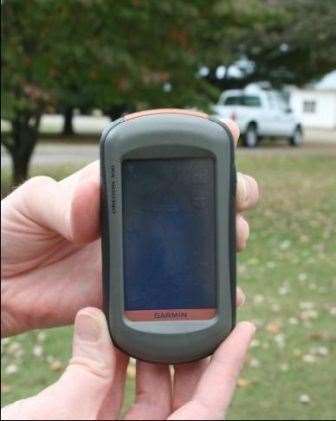
Global Positioning System (GPS) units are available to fit almost any budget and offer a wide range of uses. Handheld GPS units are lightweight, inexpensive portable devices used to provide navigation and basic mapping capabilities (Figure 1). They are most commonly used for outdoor recreation activities such as fishing, hunting, and geocaching; however many units can also be used for area calculation and marking points and/or routes of interest. These units range in price from approximately $100 to $500 and are available from several different companies. The most popular manufacturers are Garmin (www.garmin.com), Magellan (www.magellangps.com) and Lowrance (www.lowrance.com). They can be purchased online or locally at almost any sporting goods or mass merchandise store.
Features and Considerations
Features and capabilities vary between units. Most units provide compass features, navigation capabilities, and the ability to mark points. The following features are the most common to consider when purchasing a handheld GPS.
- WAAS capability - The Wide Area Augmentation System (WAAS) is the differential correction service provided through the U.S. Federal Aviation Administration. This correction service is free to the user and provides an improved accuracy of 15 feet or less. Units that do not have the ability to utilize WAAS will have a great reduction in accuracy so it is important to purchase a unit with this feature.
- Satellite reception – Ensure your unit has the capability to track numerous satellites. Four satellites are needed to compute an accurate GPS position, however the more satellites your unit tracks, the greater the chance you will have of obtaining a quality GPS Figure 1 position. If you will be operating your unit in areas with weak satellite reception, such as under tree canopy, choose units
specifically designed for this application. - Built-in memory – Built-in memory allows the unit to store background maps (Figure 2). These maps are purchased separately from the unit, typically on CD. There are several types of background maps available including those for traveling (cities, states, etc.), water navigation (rivers, streams, lakes, etc.) and general maps containing elevation and topographic information. Choose the unit that offers mapping options which best fit your needs.
- Data transfer and/or storage – Maps, points, routes and other information can be downloaded to the unit from your computer and vice versa. Several units also have SD or mini-SD card capabilities
Figure 2. Navigation, mapping and recreational options available on handheld GPS units.
For data storage and transfer. Consider whether additional accessories or software will have to be purchased for you to transfer or download data.
- Viewing and Editing Data –Software is available that enables you to view, edit or incorporate additional layers to the data collected with your GPS unit. Determine what you want to do with the data you collect and whether capable software is included with your purchase or must be purchased separately.
- Screen and menu features – Screen size and color features vary among units. Larger color screens are often easier to see but typically are more expensive. Backlight features are beneficial when in low light conditions. Try out the unit before purchasing to make sure the menu and control buttons are easy for you to understand and navigate.
- Battery – Determine the type of battery the unit uses as well as the average battery life. Rechargeable batteries can be a convenient feature if you will be using your unit frequently.
- Area calculation – Many units provide the ability to determine the area of a location which is beneficial for determining the size of your yard, pasture, garden, etc. Area calculations can be provided in multiple units such as square feet, acres, hectares, etc.
- Point features – Units vary as to the number of points you can store in the unit and the point editing capabilities.
- Bluetooth – Newer units often have Bluetooth capabilities which allow for wireless transfer of information from one unit to another.
- Other features – Additional features such as calendar, stopwatch, alarm clock, calculator, hunting and fishing report, games, picture viewer and geocache tools are available on many models.
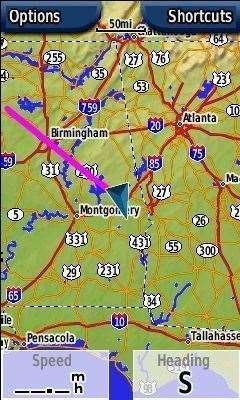
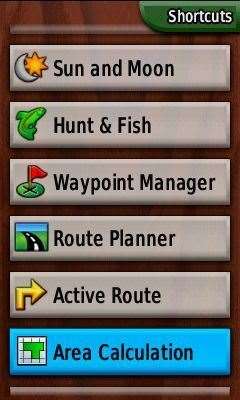
Figure 2
Disclaimer
The mention of trade names and commercial products is for informational purposes and does not necessarily imply endorsement by the Alabama Cooperative Extension System.
Prepared by
Amy Winstead, Regional Extension Agent and Shannon Norwood, Multi-County Extension Agent, Alabama Cooperative Extension System; Daniel Mullenix, Research Engineer and John Fulton, Associate Professor and Extension Specialist, Auburn University.