Farmers have two more days to plant corn and five more for soybeans
By Diego Flammini
Staff Writer
Farms.com
Ontario cash crop farmers have a bit more time to get their crops planted before experiencing any crop insurance implications.
On Friday, Agricorp announced it is extending the planting deadlines for corn and soybeans by two and five days, respectively.
“This spring has been difficult for farmers, with wet and cool weather and market disruptions causing concerns. Agricorp is here to help and respects that customers' time is limited,” the organization said in a statement Friday.
Corn growers in Area D have until June 12 to plant their corn, while farmers in Areas A, B and C have until June 17. In both cases, Agricorp extended the deadlines by two days.
Soybean farmers in Area D will have until June 25 to finish planting. And farmers in Areas A, B and C will have until July 5 to get their soybeans planted. These extensions equate to an extra five days for each region.
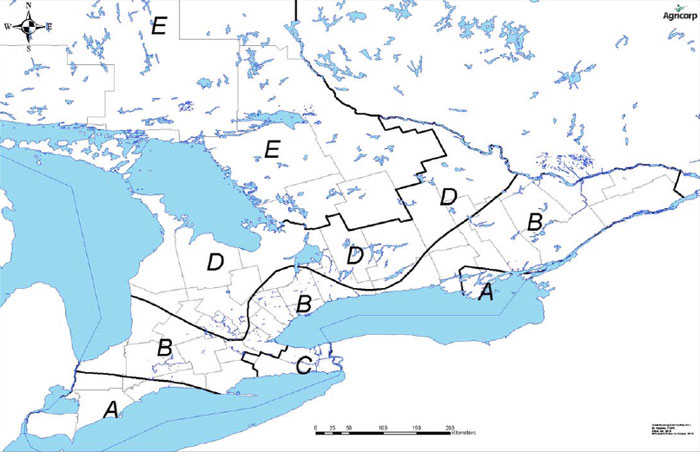
Agricorp map
Farmers growing coloured and white beans also received planting extensions.
Producers welcomed the news of Agricorp’s extension given the spring they’ve had.
“This is one of the wettest springs I’ve ever seen and I have nothing planted,” Chris Chadwick, a cash crop producer from Chatham-Kent, told Farms.com. “I think, with those added days, I should be able to get my crops in on time.”
Growers that have finished planting hope their fellow farmers can get their crops planted during the extended timeframe.
“I have all my crops in but I know one of my neighbours is having a tough time,” Randy Denney, a cash cropper from Brant County, told Farms.com. “The extensions are good news for the farmers who need them, so let’s hope they can get everything planted before those dates come.”